
Jev vs. Five LLMs: Selection Quality, Latency, and Cost for Building RAG Systems
Case study · RAG · LLM · Jev · latency and cost
When building a RAG system, choose a model for a specific task: quickly removing irrelevant documents, reviewing borderline sources, or answering questions using retrieved context. Each stage has different requirements for quality, latency, and cost. This article examines data selection before indexing: I compare Jev and five LLMs on 200 GitHub projects and show how the results help assign tasks to different models.
RAG needs the right model at each stage, rather than a single “best LLM.” In this sample, Jev was useful for fast initial filtering, Claude for quick, permissive review, and Grok for strict selection. A model aggregator helps test these options on the same data and choose a combination that meets the system’s requirements.
This follows “TypeSafe and Jev in Laravel” and “Running a Local LLM in Production: Ollama and Laravel.”
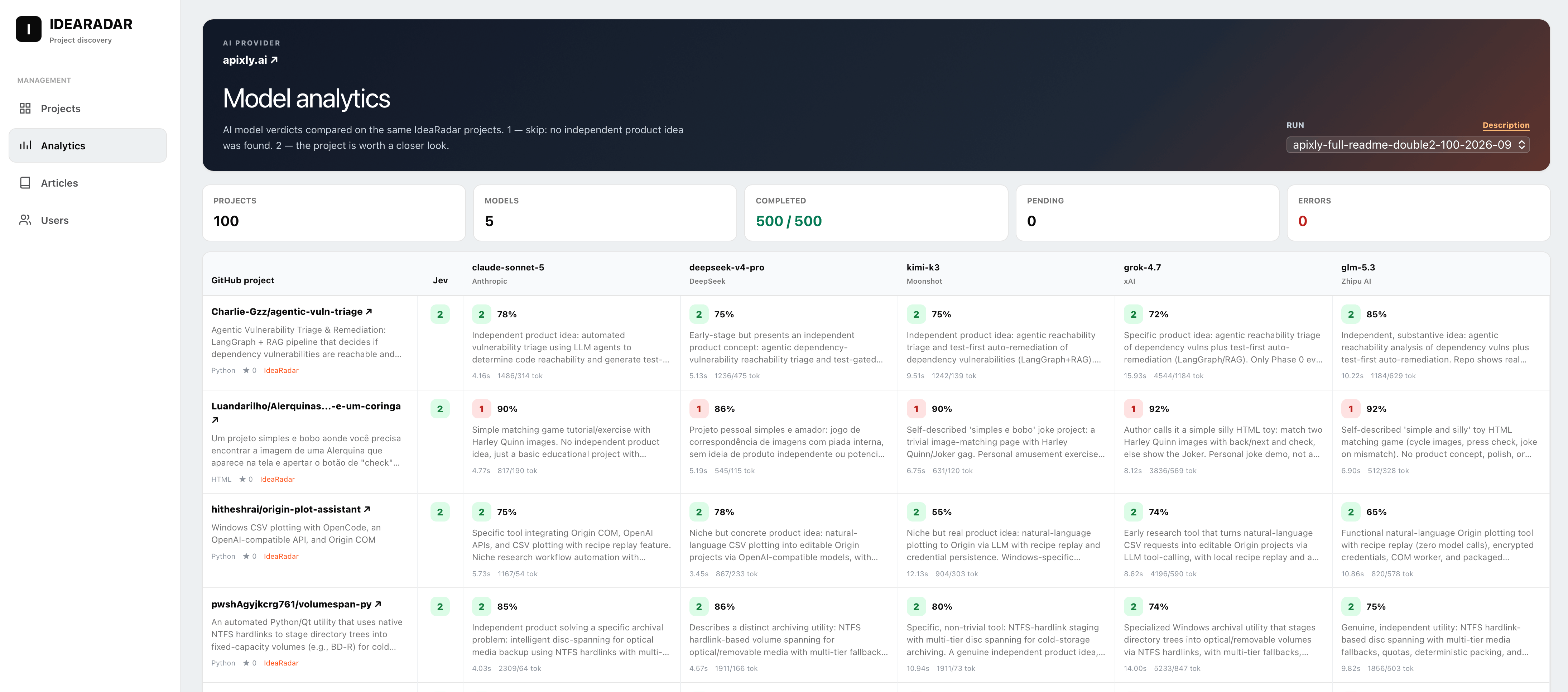
All five LLMs in the experiment ran through apixly.ai using an OpenAI-compatible API. This let me compare models within a single integration: I changed the model while keeping the inputs, response format, and measurement method consistent.
Why a RAG system needs a filter before the model
In RAG and analytical pipelines, the final model is rarely the only constraint. Quality depends on what enters the index and reaches deeper analysis. Irrelevant material in the vector database means extra context tokens, misleading sources in answers, and recurring costs on subsequent requests.
In IdeaRadar, projects pass through a sequence: collection from GitHub, a PHP filter for obvious noise, a short AI assessment, and deeper analysis with DeepSeek. This article asks which model should handle that short assessment, and what the choice means for quality, latency, and cost.
For RAG, this is corpus preparation: deciding which sources are worth storing and indexing. Here, I test project selection based on READMEs. The experiment does not measure embedding quality, retrieval, ranking of retrieved passages, or final answers. Those stages require separate tests using your system’s documents and questions.
How I ran the experiment
The sample
Projects that had passed the PHP pre-filter (pass or review) and already received a Jev label. Two independent, non-overlapping sets of 100 projects: Jev = 2 means “worth considering,” and Jev = 1 means “reject.”
The models
claude-sonnet-5, deepseek-v4-pro, glm-5.3, grok-4.7, and kimi-k3. I took the exact identifiers from the gateway’s GET /v1/models response rather than guessing them.
One prompt for every model
The same semantics as Jev: 1 means reject, 2 means worth considering; when uncertain, choose 2.
Identical input
The complete normalized README, name, description, topics, and repository metadata.
A strict response format
JSON:
{"verdict":1|2,"confidence":0-100,"reason":"..."}, without streaming.Consistent latency measurement
Requests run sequentially within each model, with latency measured only around the HTTP call. I save the raw response, token counts, status, and input hash.
A key limitation. Agreement with Jev is not accuracy. There is no manually labeled ground-truth dataset yet, so I examine agreement between models and manually review disputed cases.
How an aggregator helps choose a model for RAG
A comparison quickly becomes less useful if each model needs a separate client, different error handling, and incompatible metrics. Through Apixly, I sent requests to one OpenAI-compatible endpoint and changed the model using identifiers from GET /v1/models. This kept the prompt, JSON format, timeouts, logging, and latency measurement consistent.
A shared gateway does not make model responses identical or remove differences between providers. It removes an extra integration variable: the experiment compares model behavior rather than five different SDKs. In production, it also simplifies fallback routing: if one model fails, the application can send the task to another without rewriting the entire pipeline.
The practical benefit of aggregators such as apixly.ai is being able to select a model for each RAG stage instead of building the whole system around the first LLM you connect. For filtering, compare false rejections and cost per check; for interactive answers, latency and grounding in retrieved sources; for background analysis, completeness and processing cost. The last two tasks need their own evaluation sets: the best filter is not necessarily the best answer generator.
A useful workflow is to prepare a manually labeled evaluation set, run candidates through a shared client, compare quality and p95 latency at the required load, and assign a model to each task. A shared API simplifies repeated evaluations and model substitutions, but each model’s limits, parameters, and response format still need checking.
The first problem: 24 empty responses out of 500
In the first run, GLM-5.3 returned 14 invalid responses and Kimi K3 returned 10. There was no API error: HTTP 200, but the JSON was truncated.
The cause was the max_tokens limit. Both models perform hidden reasoning even when not explicitly asked to. All 14 GLM responses hit exactly 1,024 output tokens, with 991–1,024 spent on reasoning. Kimi hit exactly 256. There was no room left for a one-digit verdict and a short explanation.
After increasing the limits to 4,096 for GLM and 2,048 for Kimi and repeating the same requests with the same inputs, I obtained 500 valid responses out of 500. One retried GLM response used 3,875 output tokens.
For reasoning models,
max_tokenscovers both reasoning and the answer. Setting it too low can turn a paid request into unusable output rather than save money. Track invalid responses as a separate metric instead of silently discarding them.
Test 1: how LLMs judge the projects Jev accepted
100 projects that Jev rated 2.
| Model | Agrees with Jev | Rejects | Mean confidence |
|---|---|---|---|
| Claude Sonnet 5 | 79% | 21% | 78 |
| GLM-5.3 | 66% | 34% | 74 |
| DeepSeek V4 Pro | 65% | 35% | 75 |
| Kimi K3 | 56% | 44% | 74 |
| Grok 4.7 | 41% | 59% | 80 |
| “Worth considering” votes | 0 | 1 | 2 | 3 | 4 | 5 |
|---|---|---|---|---|---|---|
| Projects | 19 | 9 | 10 | 9 | 14 | 39 |
All five models unanimously rejected 19 projects. I checked them manually and agreed: a tutorial ML pipeline using a public dataset, a personal portfolio, a company website, a shader collection, school projects explicitly described as such in their READMEs, and Docker Compose wrappers around other services. A majority of three or four models rejected another 19 projects.
Overall, a majority of LLMs rejected 38 of the 100 projects Jev considered worthwhile. Those projects would otherwise add unnecessary work to the next stage, entering expensive analysis or the RAG index.
Models differ significantly in strictness
Pairwise agreement shows that these models are not interchangeable judges. GLM-5.3 and Kimi K3 agreed in 90% of cases; Claude and GLM, and DeepSeek and GLM, agreed in 85%; Claude and Grok agreed in only 60%.
Grok 4.7: the strictest
Its rejection reasons were specific: hardcoded /home/li paths in a supposed product, a dashboard for two agents at one business, a skill from a mass-produced template catalog, and documentation without code.
Claude Sonnet 5: the most permissive
It was closest to Jev. Sometimes this was justified, sometimes not: Claude accepted a group coursework project with a course code in its description because the architecture was nontrivial.
Choosing a model here means choosing a selection policy. If missing a good idea costs more than reviewing an extra project, use a permissive model. If the next stage is expensive, consider a stricter one.
Test 2: can I trust Jev’s rejections?
100 new projects that Jev rejected.
| Model | Agrees with Jev | Projects considered worthwhile |
|---|---|---|
| DeepSeek V4 Pro | 100% | 0 |
| Grok 4.7 | 100% | 0 |
| Kimi K3 | 99% | 1 |
| GLM-5.3 | 98% | 2 |
| Claude Sonnet 5 | 92% | 8 |
91 projects were rejected unanimously. Seven received one “worth considering” vote, and two received two votes. No project received a majority of positive votes.
Reviewing the disagreements supported Jev’s decisions. Five of Claude’s eight “finds” were nearly identical forks of a Discord blocking-circumvention tool under different anonymous accounts. Such clone sequences suggest mass-generated repositories rather than independent products. The remaining disputed cases were a personal knowledge base, a marketing website without product code, and a Vite template without an implementation.
Latency: RAG needs predictable tails, not just a low median
If the filter is part of an interactive flow where a user uploads documents and waits for an answer, the 95th percentile and maximum matter more than the average. These slow requests are what users experience as the system hanging.
| Model | p50 | p95 | max |
|---|---|---|---|
| Jev (previous article) | 0.6 s | 0.7 s | — |
| Claude Sonnet 5 | 3.6 s | 5.7 s | 14.2 s |
| DeepSeek V4 Pro | 4.8 s | 10.5 s | 18.1 s |
| GLM-5.3 | 10.9 s | 20.7 s | 28.3 s |
| Kimi K3 | 10.9 s | 29.5 s | 52.1 s |
| Grok 4.7 | 11.7 s | 21.8 s | 28.3 s |
| Model | p50 | p95 | max |
|---|---|---|---|
| Claude Sonnet 5 | 3.4 s | 4.6 s | 4.9 s |
| GLM-5.3 | 4.0 s | 15.6 s | 27.1 s |
| DeepSeek V4 Pro | 4.3 s | 11.0 s | 18.8 s |
| Grok 4.7 | 6.0 s | 13.7 s | 17.5 s |
| Kimi K3 | 6.6 s | 21.6 s | 41.6 s |
An order-of-magnitude difference
Jev is roughly six times faster than the fastest LLM and 15–20 times faster than the reasoning models.
Hidden reasoning adds latency
On obvious rejection cases, GLM used an average of 278 reasoning tokens and responded in 4 s; on borderline projects, it used 556 tokens and took 11 s. The model spends more time thinking when the decision is difficult, and the user feels the delay.
Long latency tails
Kimi K3 reached 52 s, and an earlier run on 500 projects included a 149 s response. A synchronous RAG request needs a timeout and fallback strategy to handle this.
The most predictable model
Claude Sonnet 5 ranged from 3.4 to 4.9 s on clear-cut cases.
How long would the full workload take?
At the time of the experiment, IdeaRadar contained 26,634 projects that had passed the PHP filter. Estimates based on mean latency:
| Approach | Sequential | 10 concurrent workers |
|---|---|---|
| Jev only | ≈ 4.7 h | ≈ 0.5 h |
| Claude Sonnet 5 only | ≈ 27 h | ≈ 2.7 h |
| Kimi K3 only | ≈ 66 h | ≈ 6.6 h |
| Jev + Claude only for Jev = 2 | ≈ 4.7 h + 18 h | ≈ 2.3 h |
These are approximate estimates: gateway and provider latency may increase under concurrent load, and each provider has its own rate limits.
Cost per 1,000 checks
These were the actual gateway rates in the groups used for these requests, per million input/output tokens: Claude Sonnet 5 — $0.40/$2.00; DeepSeek V4 Pro — $0.858/$2.574; GLM-5.3 — $0.70/$2.20; Grok 4.7 — $0.20/$0.60; Kimi K3 — $1.95/$9.75. My token-based calculation closely matched billing: $4.62 versus $4.54 for all approximately 3,000 requests across the experiment, with the difference attributable to cache discounts.
| Model | Borderline projects | Clear rejection cases |
|---|---|---|
| Claude Sonnet 5 | $0.97 | $1.10 |
| Grok 4.7 | $1.38 | $1.12 |
| DeepSeek V4 Pro | $2.12 | $1.56 |
| GLM-5.3 | $2.47 | $1.66 |
| Kimi K3 | $4.30 | $3.92 |
Token prices can be misleading
Grok 4.7’s input tokens cost half as much as Claude’s, but the gateway counted roughly 4,460 input tokens per request for Grok versus 1,400–2,000 for the others with the same prompt. Kimi K3 was expensive because of its output rate; GLM because of its reasoning volume.
Measure cost per decision
Compare the cost of a completed response, not just the price list. The fastest model in this test was also the cheapest per 1,000 checks.
Which model should handle each RAG task?
These are starting points based on this README selection test: roles in data processing, not a general intelligence ranking. Before applying them to another domain, evaluate the candidates on your own labeled sample.
Jev: the first corpus filter
A candidate for high-volume workloads that need fast preliminary assessment. Its median latency in the previous test was 611 ms; in this sample, none of its 100 rejections received a majority of “worth considering” votes. Positive decisions need another check.
Claude Sonnet 5: permissive selection
A candidate when keeping more potentially useful sources and returning a quick decision matter most. On borderline projects, p95 was 5.7 s and cost was $0.97 per 1,000 checks. Being permissive also means accepting more irrelevant material.
Grok 4.7: reduce unnecessary processing
A candidate when the next stage is expensive and stricter selection is acceptable. It rejected 59% of Jev’s positive decisions, more than any other model. For RAG systems where losing a useful source is costly, measure false rejections first.
DeepSeek V4 Pro: another candidate
In this sample, it rejected 35% of Jev’s positive decisions, between Claude and Grok; p95 was 10.5 s and cost was $2.12 per 1,000 checks. Include it in the comparison if neither extreme suits your selection policy.
GLM-5.3 and Kimi K3: test the value of reasoning
Candidates for a separate pass over disputed cases when higher latency is acceptable. GLM and Kimi agreed on 90% of decisions in this test; that does not prove greater accuracy. Extra tokens are justified only by a measurable improvement on your task.
Answer generation: a separate model choice
This test does not identify the best model for final RAG answers. Compare candidates on questions about your own corpus: correctness, source references, behavior when information is missing, latency, and cost. An aggregator helps run that comparison through the same client.
Combining models to select data for RAG
| Jev’s decision | What the LLMs said | Is it trustworthy? |
|---|---|---|
| 1 — reject | 0 of 100 received a positive majority; 91% were rejected unanimously | Yes: reject at the first stage |
| 2 — worth considering | A majority rejected 38 of 100; 19 were rejected unanimously | No: review again |
Rules in code
Remove obvious cases without AI: profiles, empty repositories, templates, and duplicates.
Run Jev on the full stream
Fast at 0.6 s, predictable, and effective at rejecting irrelevant projects in these tests. In this database, roughly 37% of projects stop here.
Use an LLM only for Jev = 2
Choose Claude Sonnet 5 when preserving ideas and keeping latency low matter most. Consider Grok 4.7 or DeepSeek V4 Pro when reducing the workload of an expensive downstream stage is the priority.
Deeper analysis
Indexing and expensive processing start only after the second filter.
Based on these figures, this approach removes roughly a third of the noise that Jev alone would send to the expensive stage, while avoiding LLM calls for obvious rejection cases.
What to check before production
- Manual labelsReview 100–200 disputed projects. Model agreement is a useful signal, not ground truth.
- Two different modelsOn borderline cases, pairs with 60–75% agreement provide more information than nearly identical judges.
- Timeouts and fallbackWhen latency grows too high, return Jev’s result or move the LLM check to a queue.
- Response limitsConfigure
max_tokensseparately for each model and track invalid responses as their own metric. - The model catalogVerify actual identifiers and model capabilities. For example, in Apixly,
minimax-h3is a video model, whileminimax-m3is used for text. - Provider availabilityGemini 3.1 Pro and GPT-5.6 returned HTTP 503 in my smoke tests, so I excluded them from the comparison.
A fast specialized model and a general-purpose LLM complement each other. Jev is good at saying “no” in fractions of a second. LLMs are useful where Jev says “yes.” At that stage, choose a model with the right strictness, predictable tail latency, and a clear cost per decision, rather than simply the model perceived as the smartest.
Frequently asked questions about choosing models for RAG
Which model performed best?
There is no universal winner. Claude Sonnet 5 was the fastest and most permissive judge, Grok 4.7 was the strictest, and GLM-5.3 and Kimi K3 tended to spend more time and tokens on reasoning. The choice depends on the cost of a false rejection and the cost of the next stage.
Can Jev fully replace an LLM?
No. In this test, Jev’s rejections were reliable, but its positive decisions were noisy: a majority of LLMs rejected 38 out of 100 accepted projects. Jev therefore fits the first filtering stage, while projects it accepts need another review.
Why might a reasoning model return an empty response?
The max_tokens budget covers both hidden reasoning and the final answer. If it is too small, the model can use it up on analysis without completing the JSON response. Set limits for each model individually and monitor invalid responses.
How did you calculate cost per 1,000 checks?
I recorded the actual input and output token counts for each request, applied the relevant group’s rates, and checked the calculation against gateway billing. The comparison therefore measures cost per completed decision, not just the listed price per million tokens.
How do aggregators such as apixly.ai help build RAG systems?
They simplify access to different models through a shared API. You can run the same sample, compare quality, latency, and cost, and then select separate models for filtering, analysis, and user-facing answers. Check each model’s parameters and availability individually.
Can this test select a model for an entire RAG system?
No. I measured GitHub project selection based on READMEs before further processing. Retrieval, ranking, and answer generation each need their own evaluation tasks. These results help identify filter candidates and show how to organize model comparisons for other stages.
Choose models for your RAG system
Earlier articles: TypeSafe/Jev vs. Ollama · a local LLM with Ollama and Laravel.
RAG · Jev · Claude · DeepSeek · GLM · Grok · Kimi · Apixly · Laravel