
PDF Document Translation in Laravel: Why I Replaced OCR with the DeepL API
Technical case study · Laravel · PDF · DeepL API · queues
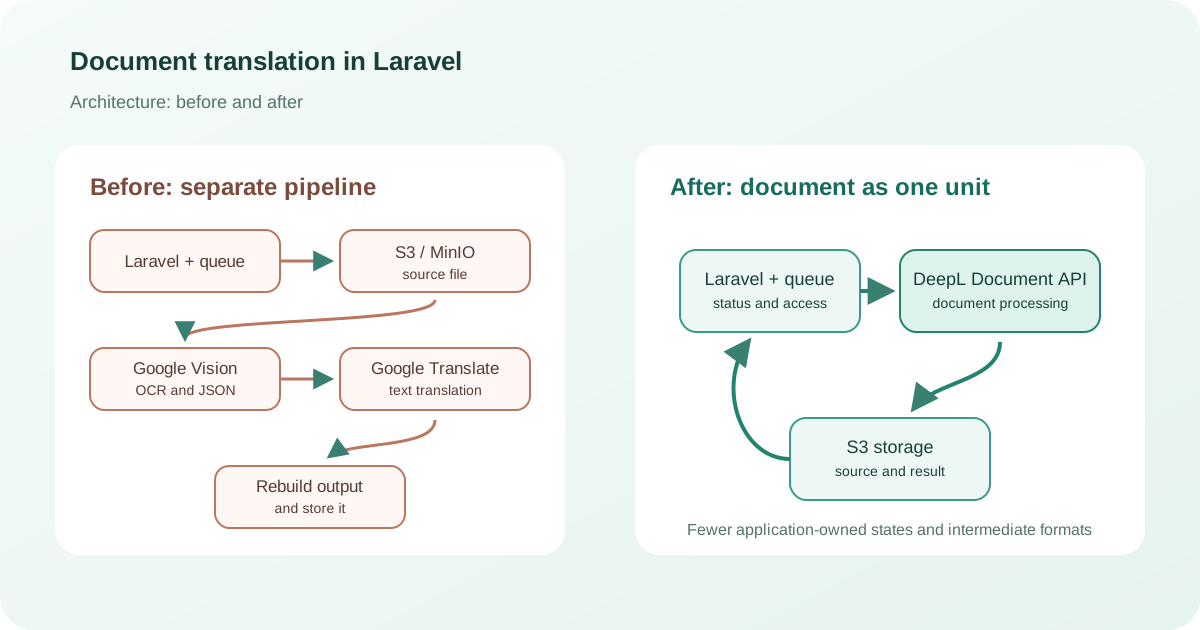
The backend had to accept documents, translate them asynchronously, and retain both the source and completed files. I initially designed a separate OCR and text translation pipeline, then replaced it with an integration using the DeepL Document API.
The main lesson: changing an architecture does not always mean adding another layer. Sometimes it is better to delegate a complete task to a specialised API and let the application focus on access control, statuses, queues, and storage.
The customer’s task
A user uploads a document, chooses a target language, and later downloads the translated file. The source and result must be retained, long-running work must not block the HTTP request, and a temporary external-service failure must not lose the job.
This requires more than calling a translator: file validation, explicit statuses, background jobs, retries, and a controlled download flow. Only accounts activated by an administrator are allowed to use the translation service.
The original architecture: OCR and translation as separate stages
Laravel orchestrated the process, PostgreSQL stored users and statuses, and MinIO stored files. Google Cloud Vision extracted text from PDFs, Google Translate translated it, and Laravel Queue ran the long operations.
Accept the file
Validate the upload, create a document record, and store the source.
Run OCR
Send the PDF for recognition and wait for text with page structure.
Translate the text
Split the material into accepted chunks, call the API, and save the responses.
Build the result
Map the translation back to the pages and store the output file.
This design is justified when recognised text is useful elsewhere. Its cost is additional state: the file, OCR operation, JSON response, translation chunks, and final result all have separate lifecycles.
Where the complexity comes from
A document is not a string
After OCR, the translation still has to be associated with pages, tables, columns, and captions.
Asynchronous operations
Every external stage needs statuses, timeouts, and safe retry rules.
Intermediate data
OCR responses and translated chunks require storage, access rules, and cleanup.
Consistency
The database, MinIO, and cloud APIs complete work at different times, but must not create duplicates.
For PDFs and TIFFs, Google documents OCR as an asynchronous operation: source files and JSON output live in Cloud Storage, while operation status is checked separately. That is a complete workflow inside the application’s own workflow.
Why I changed the architecture
The customer proposed moving to the DeepL Document API. The point was not that “one service is always better than two.” The application did not need recognised text for search, analytics, or data extraction; the valuable result was the translated file.
A Document API accepts a document and returns a document. The OCR result model, text chunking, and custom PDF reconstruction could therefore leave the code, reducing the number of integration boundaries and intermediate formats.
What I cannot claim without a separate evaluation: that the new design is always cheaper, faster, or more accurate. Those outcomes depend on file types, languages, volume, and quality criteria. The changes were delivered to the customer, but final acceptance and measured production results have not been confirmed.
The new implementation with the DeepL Document API
Upload
Laravel validates the file, creates a record, and stores the source in S3.
uploadedSubmit
A job sends the file and target language to DeepL, then stores the document ID and key.
submittedCheck status
The queue polls the API with a delay and does not create another translation.
translatingDownload
The worker downloads the completed file and saves it to S3.
completedRecord failure
The document receives an explicit status, while logs retain the reason without API keys or document contents.
failed
DeepL exposes this as a three-step document workflow: upload, check status, and download. A queue is still necessary to separate the user request from the external API, manage delays, and recover after a worker failure.
Access control
Registration alone does not enable translation: an administrator activates the account. The server checks this permission when creating a job, viewing its status, and downloading the result.
- ActivationAn administrator enables access for a specific user.
- OwnershipA user can view and download only their own documents.
- API keyThe secret remains on the backend and is never sent to the browser.
- LoggingStatus transitions and errors are recorded without confidential document contents.
How much does API document translation cost?
The complete processing cost matters more than the price of one request. An OCR plus translation pipeline includes OCR usage, translated characters, object storage, workers, traffic, and maintenance of the document reconstruction code. Those costs can be justified when recognised text supports other features.
A Document API has a simpler cost model, but its billing rules matter. The DeepL API usage rules state that PDF, DOC/DOCX, PPTX, and XLSX document translations are billed for at least 50,000 characters per file, even when the file contains less text. Many short PDFs may therefore be a less economical workload than fewer large documents.
| Cost area | OCR + translation | Document API |
|---|---|---|
| Cloud processing | OCR pages plus translated characters | Billable characters under file-specific rules |
| Storage | Source, OCR data, chunks, and result | Source and result |
| Development | Connect several APIs and rebuild a document | Implement one operation lifecycle |
| Operations | More states, retries, and diagnostic points | Fewer states, with greater provider dependency |
Estimate a real sample: monthly documents × format and size distribution × target languages, then add storage, traffic, and maintenance. Current prices and limits should always be checked before budgeting.
When OCR plus translation is still justified
A custom pipeline makes sense when recognised text is needed for search, field extraction, RAG, manual review, or specialised output generation. It also allows the OCR engine and translator to be selected independently.
A Document API is a stronger fit when the input and output are complete supported files and the application does not need the intermediate text. This is not a universal victory for a managed service; it is a closer match between the API contract and the actual task.
Frequently asked questions about document translation
Why not simply extract text from a PDF?
A PDF describes how a page is presented, not necessarily its logical document structure. Columns, tables, and captions require additional rules.
Is Laravel Queue still needed with DeepL?
Yes. Document translation is a long-running external operation. The queue manages status checks, retries, and recovery from temporary failures.
Where are completed translations stored?
After download from the API, the result is stored in S3-compatible storage alongside the source, with a separate key and status.
Is a Document API always cheaper?
No. The result depends on pricing, file sizes and counts, target languages, and maintenance costs. Minimum billable volume matters for short files.
When should separate OCR be retained?
When the recognised text supports search, field extraction, analytics, RAG, manual verification, or several translation providers.
Can DeepL be called directly from a browser?
No. The API key must remain on the server. The backend also checks user permissions, file format, and document ownership.
How do you prevent translating the same file twice?
The job is linked to a local record and the external document ID. Before submission, the worker checks the current state and does not create a new operation during a normal retry.
Who can build a similar backend?
I develop Laravel backends and APIs for file uploads, queues, external-service integrations, access control, and result storage.
Do you need to automate document processing?
I can design a backend for document upload, recognition, translation, and storage—with queues, statuses, access control, and the right external API without unnecessary technology layers.
Laravel · PostgreSQL · S3 / MinIO · DeepL Document API · OCR · Google Cloud Vision · Google Translate · Queue
From explanation to practice
API and marketplace integrationsDiscuss the scope and approach for a similar task.
Automating book listings for Ozon and WildberriesExplore the project problem, solution and limitations.